
SLS Login Guide for Students/Parents
LOGGING IN TO SLS USING MIMS ACCOUNT
Go to SLS via this link: https://go.gov.sg/sls (opens in new tab)
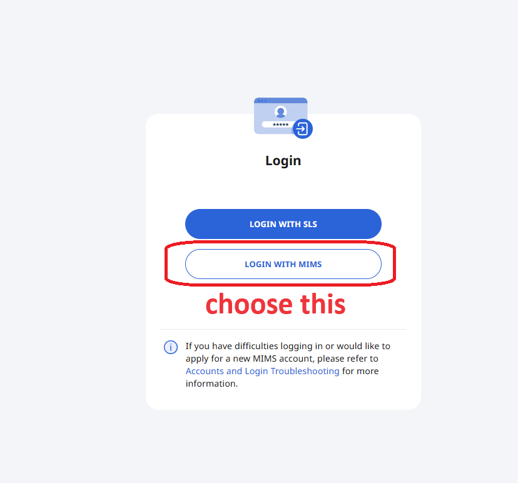
Click on “LOGIN WITH MIMS”.
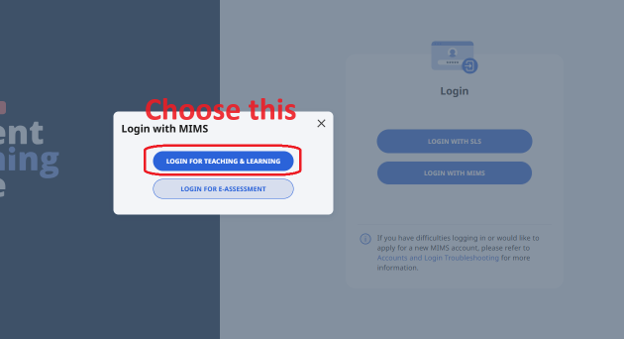
Click on “LOGIN FOR TEACHING & LEARNING” and you will be redirected into MIMS login page.
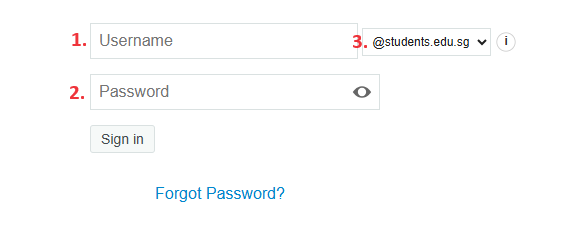
Type in your individual “MIMS LOGIN DETAILS” from your Student Diary
Student_Name (without @students.edu.sg, Example tang_mei_lan)
Password
Student domains
Then click “Sign in” to login.
If you encounter error message “Multiple attempts has been detected on this account” or “Account is locked” Please contact the school at +65 6312 6091 or email to edgefield_ps@moe.edu.sg